Can I change a draw.io diagram by typing instead of dragging?
Yes. Open your .drawio file in TazzoGram and type what should change; TazzoGram moves the boxes and arrows for you, and you can save it back as a draw.io file.
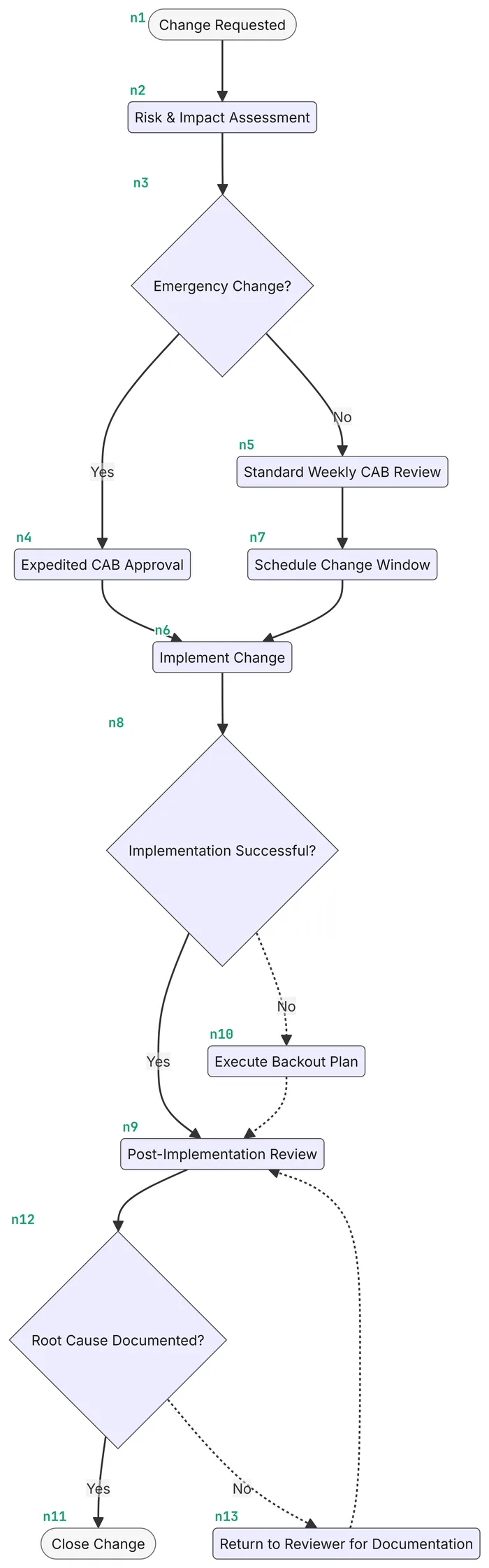
How it works
- In TazzoGram, click Open file and choose your .drawio file (or a .svg saved from draw.io).
- The diagram opens right away, with a Step ID on every box.
- Type a change, for example "after Implement Change, add a step: notify the service desk", and click Apply. Save it back as draw.io when you are done.
Good to know
- TazzoGram opens a draw.io file right here in your browser, shape by shape and arrow by arrow, so your file never leaves your computer.
- Your words come in exactly as you typed them.
- TazzoGram arranges the boxes and arrows again in a clean layout, and tells you if anything in the look of the file changed.
- A draw.io file with several pages: save each page as its own file first.
Questions
Can I save the diagram back as a draw.io file?
Yes. Save As draw.io gives you a file that opens in draw.io (diagrams.net) again.
Is my draw.io file sent to an AI when I open it?
No. Opening it happens in your browser. Only the changes you ask for later are sent to the AI.
Other files TazzoGram opens: Whiteboard photo · PDF · BPMN · Mermaid · SVG
More answers: Questions and answers · Plans & Pricing · Customer Support · Privacy Policy