Can I turn a whiteboard photo into a diagram I can edit?
Yes. Take a photo of the whiteboard, open it in TazzoGram with Open file, and you get a clean process diagram that you can change by typing or saying what should change.
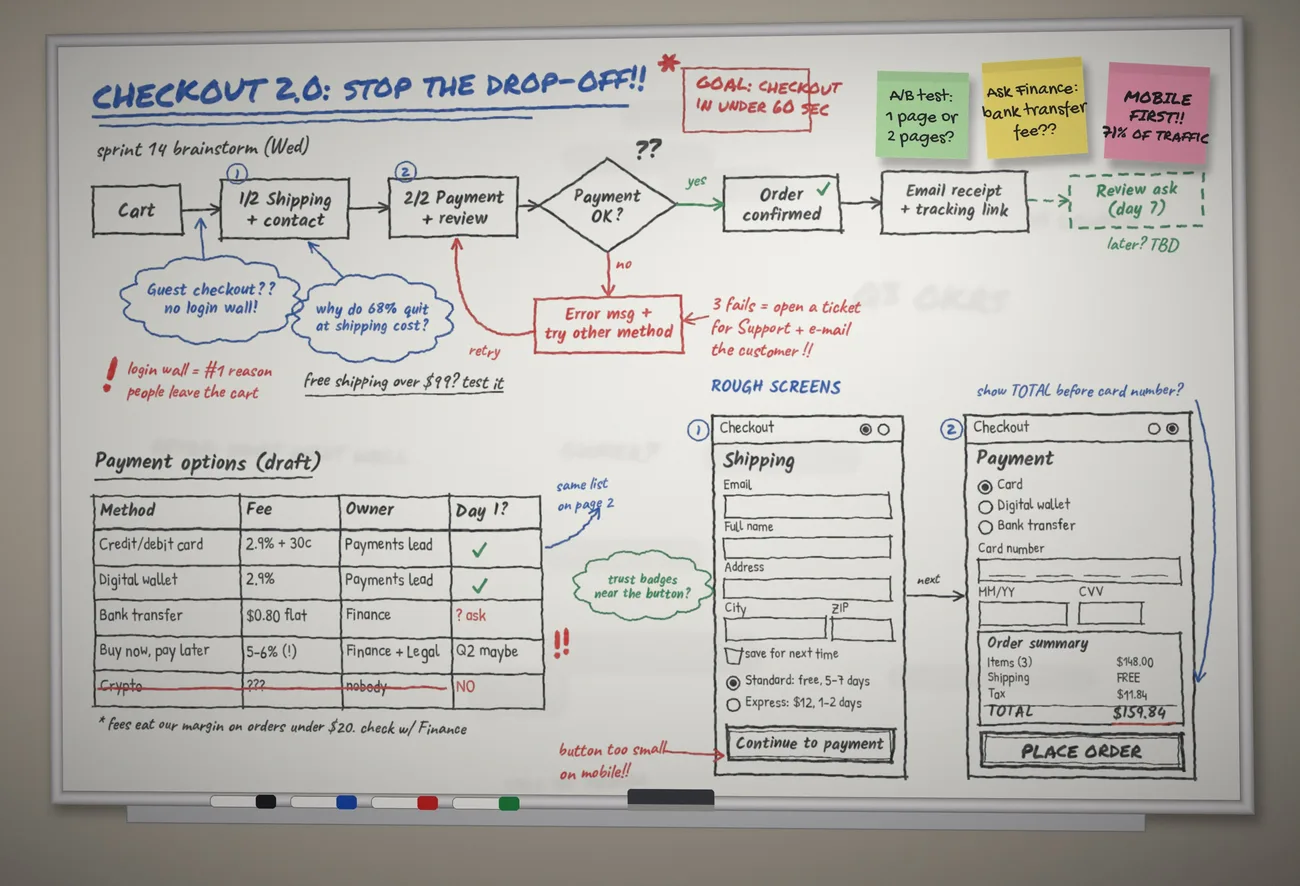
How it works
- Take a photo of the whiteboard or the sketch (JPEG, PNG or an iPhone photo).
- In TazzoGram, click Open file and choose the photo.
- TazzoGram reads the boxes, arrows and words and draws the diagram. Then type a change, for example "add a manager approval after the payment step", and click Apply.
Good to know
- Words that are hard to read in the photo are marked with ⚠, so you know which ones to check.
- Sticky notes and side comments are not lost: they go into a Whiteboard Notes box next to the diagram.
- The photo is read by Anthropic's Claude to do the work, and TazzoGram does not use it to train any model.
- A sharp, straight photo with good light gives the best result.
Questions
Can I turn a photo of a hand-drawn sketch into a diagram?
Yes. A napkin sketch or a page from a notebook works the same way as a whiteboard photo.
Which formats can I save the diagram in?
Visio (.vsdx), BPMN 2.0, draw.io, Mermaid, SVG, PDF and a web page.
Other files TazzoGram opens: PDF · draw.io · BPMN · Mermaid · SVG
More answers: Questions and answers · Plans & Pricing · Customer Support · Privacy Policy